Excel vs. Sheets: Which marketing budget template wins?
Discover the best marketing budget template Excel free by comparing the strengths of Excel and Google Sheets for your financial planning.
The moment you start assigning dollar amounts to that list of campaigns, it hits: you need a structured way to track what you plan to spend versus what you actually spend. Without it, marketing efforts can quickly spiral out of control, making it impossible to know what’s working or where your money is going. This is why so many people search for a "marketing budget template Excel free", they're looking for a practical tool to bring order to that chaos.
A well-organized marketing budget is your roadmap to efficient spending and measurable results. It’s not just about listing expenses; it's about strategic allocation, forecasting, and accountability. Whether you're a solopreneur or part of a larger team, having a clear budget prevents overspending and helps justify marketing investments by showing their impact.
Why a Marketing Budget Matters
A marketing budget isn't just a formality; it's a critical component of any successful business strategy. It forces you to prioritize initiatives, allocate resources effectively, and set clear financial targets. Without a budget, marketing can become a black hole for cash, with little accountability or clear return on investment (ROI). Think of it as a financial blueprint for your growth initiatives. It helps you answer fundamental questions like: How much can we realistically spend on advertising this quarter? What's the projected cost for our upcoming product launch campaign?
When you have a defined budget, you can also better measure the success of your campaigns. Comparing your planned expenditure against actual spending, often called a budget vs. actual analysis, reveals where you’re on track and where you might be overspending or underspending. This information is invaluable for making informed decisions about future marketing activities and optimizing your overall strategy.
Core Components of a Marketing Budget
At its heart, a marketing budget is a spreadsheet detailing anticipated costs for all your marketing activities over a specific period, usually a quarter or a year. To build an effective one, you’ll want to include several key sections.
First, Categories. Group your expenses logically. Common categories include:
- Digital Advertising: Search engine marketing (SEM), social media ads, display ads, programmatic advertising.
- Content Creation: Blog posts, videos, infographics, photography, copywriting.
- Software & Tools: Marketing automation platforms, CRM software, analytics tools, design software, SEO tools.
- Personnel: Salaries for marketing staff, freelancer fees, agency retainers.
- Events & Sponsorships: Trade shows, webinars, sponsored content, partnerships.
- Public Relations: Press releases, media outreach, influencer marketing.
- Print & Traditional Advertising: Magazines, newspapers, direct mail, radio, TV.
- Website & SEO: Website development, hosting, domain registration, SEO audits, link building.
Within each category, you’ll break down specific line items. For example, under "Digital Advertising," you might have "Google Ads - Search," "Facebook Ads - Lead Generation," and "LinkedIn Ads - Brand Awareness."
Setting Up Your Excel or Google Sheet
Creating your own marketing budget template in Excel or Google Sheets is straightforward. Start with a new blank workbook. You’ll want several columns to capture the necessary information.
Here’s a suggested structure:
- 01Category: The broad grouping of your marketing expense (e.g., Digital Advertising).
- 02Sub-Category/Line Item: The specific activity or tool (e.g., Google Ads - Search).
- 03Description: A brief note about the item, if needed.
- 04Start Date: When the expense begins or is scheduled.
- 05End Date: When the expense concludes or is scheduled to end.
- 06Frequency: How often the cost occurs (e.g., Monthly, Quarterly, One-time, Annual).
- 07Budgeted Amount: The planned expenditure for the line item.
- 08Actual Amount: The amount actually spent.
- 09Variance: The difference between Budgeted and Actual amounts (=
Actual Amount-Budgeted Amount). This is key for tracking. - 10Notes: Any additional context or explanations.
You can then add rows for each specific marketing activity. For a more visual overview, especially for tracking over time, a dashboard template can be incredibly useful. The Marketing Budget vs Actuals Dashboard Template offers a multi-year view that helps you spot trends.
Calculating Key Metrics
Once you have your budgeted and actual amounts populated, you can use formulas to get a clear picture of your financial performance.
- Total Budgeted Spend: Use a simple
=SUM(Range of Budgeted Amounts)formula at the bottom of your "Budgeted Amount" column. - Total Actual Spend: Similarly, use
=SUM(Range of Actual Amounts)for the "Actual Amount" column. - Overall Variance: Calculate the difference between your total actual and total budgeted spend.
- Category-Level Variance: You can use the
SUMIFSfunction to calculate the variance for each specific category. For example, to find the variance for "Digital Advertising," you might have a formula like:=SUMIFS(Variance_Column, Category_Column, "Digital Advertising").
Conditional formatting is also your friend here. You can set up rules to automatically highlight variances. For instance, any positive variance (meaning you spent more than budgeted) could turn red, while a negative variance (you spent less) could turn green. This makes it easy to spot problem areas at a glance.
A Walkthrough: Creating a Simple Marketing Budget
Let’s walk through setting up a basic marketing budget for a quarter.
- 01Open a New Spreadsheet: Start with a blank Excel or Google Sheet.
- 02Set Up Headers: In the first row, enter your column headers:
Category,Line Item,Frequency,Budgeted Amount,Actual Amount,Variance. - 03Populate Categories and Line Items:
- Row 2:
Digital Advertising,Google Ads - Search,Monthly - Row 3:
Digital Advertising,Facebook Ads - Lead Gen,Monthly - Row 4:
Content Creation,Blog Post Writing,Monthly - Row 5:
Software & Tools,CRM Subscription,Annual(then divide by 12 for monthly allocation if you wish, or just budget the full annual cost in the month it’s due) - Row 6:
Events & Sponsorships,Industry Webinar Sponsorship,One-time
- 04Enter Budgeted Amounts:
- Row 2:
Budgeted Amount= $1,000 - Row 3:
Budgeted Amount= $750 - Row 4:
Budgeted Amount= $400 - Row 5:
Budgeted Amount= $1,200 (for the annual cost) - Row 6:
Budgeted Amount= $500
- 05Add Formulas for Variance: In the
Variancecolumn (Column F), starting in Row 2, enter the formula=E2-D2(assumingActual Amountis Column E andBudgeted Amountis Column D). Drag this formula down to apply it to all rows. - 06Enter Actual Amounts: As you spend money, fill in the
Actual Amountcolumn. For example, if you spent $1,100 on Google Ads in the first month, enter that in E2. Your variance formula will automatically update. - 07Add Totals: At the bottom of the
Budgeted AmountandActual Amountcolumns, add rows for "Total Budgeted" and "Total Actual." Use=SUM(D2:D5)for the total budgeted and=SUM(E2:E5)for the total actual. - 08Add an Overall Variance: In the same row as your totals, calculate the overall variance:
=E6-D6(assuming your total rows are 6).
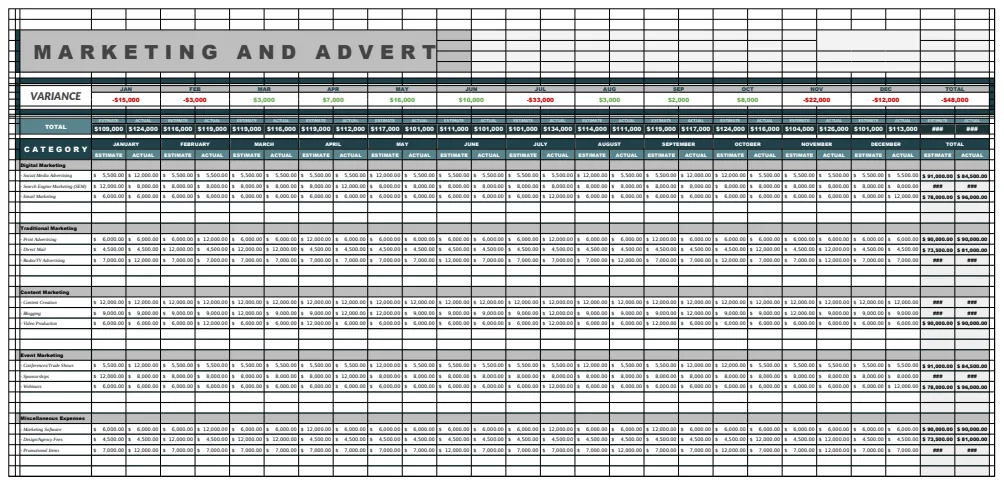
This simple structure gives you immediate insight into your spending. For more comprehensive planning, a template like the Marketing and Advertising Budget Template can handle more complex scenarios across various channels.
Common Mistakes to Avoid
When building and managing a marketing budget, several pitfalls can derail your efforts. Being aware of these can help you steer clear of them.
- Lack of Detail: Simply listing "Advertising" as a line item is too vague. You need to break it down into specific channels and campaigns to understand where the money is actually going and what’s yielding results.
- No Contingency: Unexpected opportunities or costs always arise. Failing to build in a small buffer (e.g., 5-10% of the total budget) for unforeseen expenses means you'll likely have to pull funds from other, possibly critical, areas.
- Infrequent Review: A budget is not a set-it-and-forget-it document. You should review it regularly, at least monthly, to track actual spending, identify deviations, and make necessary adjustments.
- Ignoring ROI: The budget should align with your marketing goals. If a particular channel or campaign is consistently over budget and not delivering a positive ROI, it’s time to re-evaluate its place in your strategy.
- Unrealistic Projections: Basing your budget on overly optimistic revenue forecasts or underestimating the cost of specific activities can lead to a budget that’s unsustainable from the start.
Advanced Budgeting Tips
To get the most out of your marketing budget, consider these advanced strategies:
- Channel-Specific ROI Tracking: Beyond just tracking spend, try to attribute revenue or leads back to specific marketing channels. This allows you to calculate ROI per channel and allocate budget more strategically.
- Phased Budgeting: For larger campaigns or initiatives, break down the budget into phases. This helps manage cash flow and allows for go/no-go decisions at key milestones.
- Scenario Planning: What if your lead generation costs double? What if a major trade show is canceled? Develop best-case, worst-case, and most-likely scenarios for your budget to prepare for different outcomes.
- Integration with Sales Forecasts: Ensure your marketing budget aligns with sales targets. If sales expects a 20% increase, your marketing budget should reflect the necessary investment to support that growth.
What if I need to track multiple marketing campaigns?
If you’re managing several distinct campaigns, you’ll want to ensure your budget template allows for granular tracking. You can add a "Campaign Name" column to your spreadsheet. This lets you filter or group your expenses by campaign, making it easy to see the individual cost and performance of each initiative. Templates like the Business Marketing Budget Template are designed to accommodate this level of detail, allowing for budget vs. actual comparisons across various business functions, including marketing.
How often should I update my marketing budget?
You should ideally review your marketing budget at least once a month. This allows you to track actual spending against your budgeted amounts, identify any significant variances, and make necessary adjustments. For fast-paced campaigns or businesses with highly variable expenses, weekly reviews might be more appropriate. The goal is to have up-to-date information to make informed decisions.
Can I use a free template and still get good results?
Absolutely. While premium templates offer more features and polished dashboards, a well-structured "marketing budget template Excel free" can be highly effective. The key is not the template itself, but how you use it: be detailed in your line items, be diligent in tracking actuals, and be consistent in your reviews. For many small businesses or individuals, a free template is more than sufficient to gain control over their marketing spend.
What if my actual spending is consistently higher than budgeted?
This is a common challenge. It often points to one of a few issues: unrealistic initial budgeting, underestimation of costs, or a shift in marketing strategy that requires more investment. First, carefully analyze your actual spending line by line. Are there specific categories where you're consistently overspending? Could you negotiate better rates with vendors, or is the cost simply higher than anticipated? If the overspending is due to a strategic shift, you may need to formally revise your budget, reallocating funds from less critical areas or seeking additional investment. Consistent overspending without a clear strategy or justification can be a red flag for financial mismanagement.