Google Sheets vs. Excel: Which habit tracker template wins?
Discover the best habit tracker spreadsheet template free, comparing Google Sheets and Excel for practical progress tracking.
The most common mistake people make with habit trackers is designing them for perfect streaks, ignoring the reality of missed days. A truly useful habit tracker spreadsheet template free should accommodate these lapses, showing progress over time rather than just binary success or failure. This is why many templates, while looking good initially, fall apart after a week or two. You want a tool that encourages consistency, not discourages you when life happens.
Finding a habit tracker spreadsheet template free that meets these practical needs can feel like a treasure hunt. Many are overly simplistic, lacking the ability to track multiple habits or view progress over longer periods. Others are so complex they become a habit to manage the tracker itself. The best templates strike a balance, offering enough detail to be insightful without becoming overwhelming.
Designing Your Habit Tracker
When building your own or evaluating a template, consider the core components. You'll need columns for each habit you want to track, rows for each day, and a way to mark completion. Think about how granular you need to be. Are you tracking "exercise" or "30-minute run"? The former is easier to log, but the latter provides more specific data if that's your goal.
Consider the timeframe. Most people benefit from a monthly view. This allows for observing patterns without the overwhelming scale of a year-long sheet. A good habit tracker spreadsheet template free often defaults to this monthly structure. You can then duplicate sheets for subsequent months.
Essential Columns for a Habit Tracker
Let's lay out a practical structure. Imagine you're tracking hydration, reading, and meditation.
- Date: This is your primary axis. A simple date column is crucial.
- Day of the Week: Useful for spotting weekly patterns (e.g., are you less consistent on weekends?).
- Habit 1: Hydration (Water Intake): Use a checkbox, a "1" for completion, or a number if you're tracking quantity (e.g., liters).
- Habit 2: Reading: A checkbox or "1" works well here.
- Habit 3: Meditation: Again, a checkbox or time spent.
- Notes/Reflection: A small column for quick thoughts. "Felt tired today," "Read for 45 minutes," or "Meditated outdoors." This adds context.
- Weekly Total/Streak: A calculated field to show how many days a habit was completed that week.
- Monthly Total: A sum of completions for the entire month.
Using Formulas for Insight
Formulas transform a simple log into an actionable tool. Even a basic habit tracker spreadsheet template free can benefit from these.
Conditional Formatting: This is key for visual feedback.
- Rule: If "Hydration" cell equals "1" (or is checked), fill the cell green. If it's blank or "0", leave it white or fill it red.
- Application: Apply this to all your habit completion columns. It makes spotting successes and misses at a glance effortless.
SUMIFS for Totals: To calculate monthly completions.
- Formula Example (for Hydration):
=SUMIFS(C2:C32, B2:B32,">=1/1/2026", B2:B32,"<=1/31/2026", D2:D32, 1) C2:C32: Your Hydration completion column (assuming data is in rows 2-32 for January).B2:B32: Your Date column.">=1/1/2026"and"<=1/31/2026": These are criteria to sum only for January. Adjust the dates for other months.1: The criteria that the Hydration column must equal 1 (meaning completed).
COUNTIF for Streaks: To track consecutive days.
- Formula Example (for Hydration Streak): This can get complex quickly. A simpler approach is to manually note streaks or use helper columns. For a basic streak count in a specific cell (e.g., showing the current streak for Hydration ending today):
=IF(C2=1, IF(C3=1, C3+streak_from_above, 1), 0). You'd need to adapt this for each row and manage it carefully. For many, a visual "streak" number is less critical than overall completion percentage.
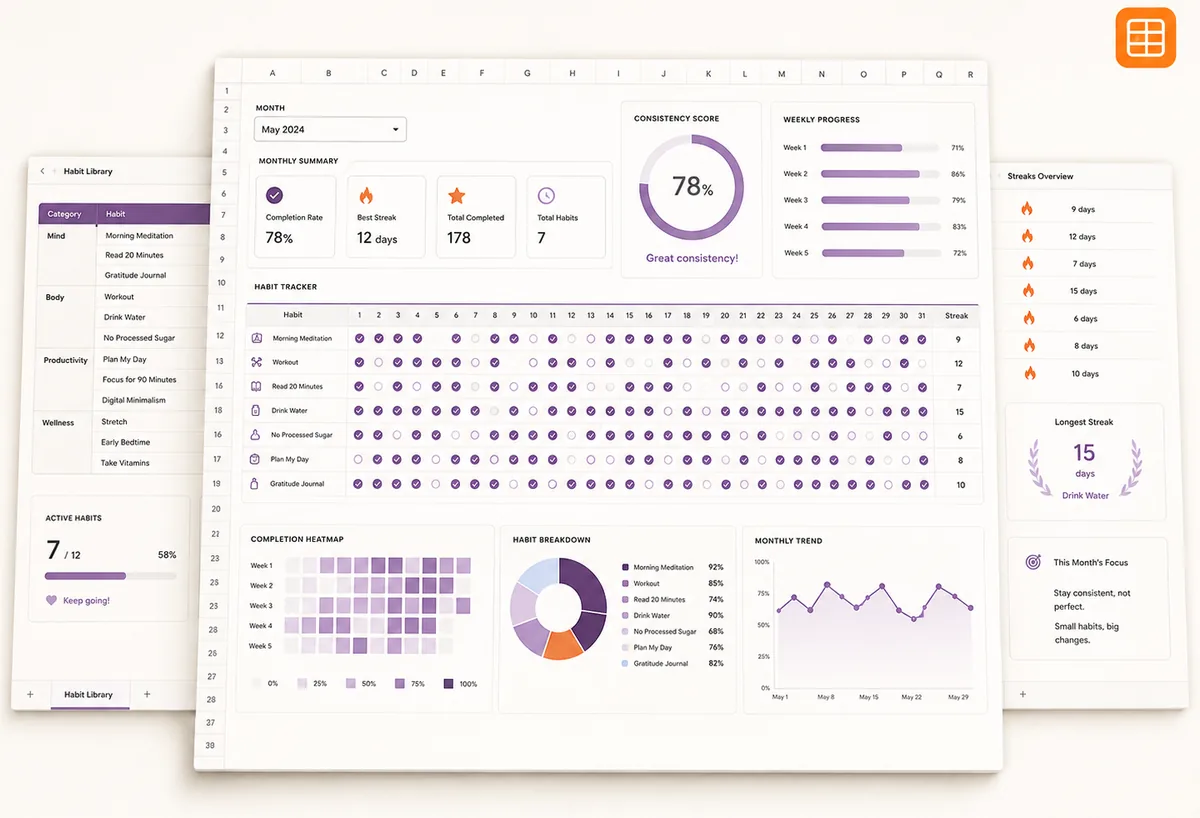
If you're looking for a pre-built solution that handles these calculations and offers beautiful visualizations, the Habit Tracker Spreadsheet Purple Edition is an excellent choice. It includes monthly progress analytics that make understanding your trends straightforward.
Tracking Multiple Habits Effectively
When you're trying to build several new habits at once, organization is paramount. A spreadsheet can quickly become cluttered if not structured properly.
- Group Similar Habits: If you're tracking exercise, maybe have sub-columns for "Cardio," "Strength," and "Flexibility" if you want that level of detail. Or, keep them as separate main habits.
- Use Color Coding: Beyond conditional formatting for completion, you can assign distinct colors to different categories of habits (e.g., health, learning, personal development) for a quick visual overview.
- Limit the Number of Habits: It’s tempting to add everything. Start with 2-4 core habits. Once they are established, you can gradually add more. Trying to track ten new habits simultaneously is a recipe for overwhelm.
The Daily Diary & Personal Tracker template can be adapted for habit tracking, especially if you want to correlate habits with mood or other daily metrics. It’s designed for a holistic view of your personal well-being.
Avoiding Common Pitfalls
- Over-complication: Adding too many columns, complex formulas, or intricate logic can make the tracker a chore. Keep it as simple as possible while still providing value.
- Perfectionism: As mentioned, aiming for perfect 100% streaks is demotivating. Build in room for missed days. Acknowledge progress, not just perfection.
- Lack of Review: A tracker is useless if you don't look at it. Schedule time weekly or bi-weekly to review your progress, identify patterns, and adjust your approach.
- Forgetting to Log: This is the most basic error. Make logging a habit itself, perhaps tying it to an existing routine like your morning coffee or evening wind-down.
When to Use a Template vs. Building Your Own
Building a habit tracker from scratch gives you complete control, which is great if you have very specific needs. You can tailor every column, formula, and visual element. However, this also requires time and spreadsheet knowledge.
For many, a well-designed template is the fastest path to effective tracking. You get a functional, often visually appealing, system without the initial setup headache. The Practice Chart is excellent for tracking skill development, which often requires consistent daily or weekly effort. It focuses on progress over a defined period, making it ideal for learning new skills.
If you're working with a team or want to introduce a bit of friendly competition, the Daily Checklist Challenge offers features for group tracking and completion rates, which can be highly motivating.
Ultimately, the best habit tracker spreadsheet template free is the one you'll actually use consistently.
What if I miss a day?
Don't worry about it. A good tracker accounts for this. Instead of a perfect streak, focus on your overall completion percentage for the month. If you miss a day, just log it as incomplete and move on to the next day. The goal is progress, not an unbroken line of checkmarks. Many templates allow you to simply leave a cell blank or mark it with a "0" for missed days.
How do I track habits that aren't daily?
For habits you do weekly (e.g., "go for a long hike" once a week), adjust your structure. You could have a column for that specific habit and mark it if completed that week. Alternatively, you can create weekly summary rows or use a separate tracker for less frequent activities. The key is to match the tracking frequency to the habit's natural rhythm.
Can I track more than one habit in a single column?
It's generally not recommended. Trying to cram multiple data points into one cell (e.g., "Ran 3 miles, Drank 8 glasses water") makes formulas and analysis very difficult. It's much cleaner to dedicate a separate column for each distinct habit you want to monitor. This keeps your data structured and easy to interpret.
How do I view my progress over time?
Beyond the monthly totals in your tracker, consider creating a separate summary sheet. This sheet could pull data from your monthly habit trackers to show year-over-year trends, average completion rates per habit, or identify your most consistent days of the week. Some advanced templates include built-in dashboards for this purpose, offering charts and graphs that visualize your journey. The library of templates at OpenWorksheet offers a variety of options, and the full library is available for a one-time fee of $9, providing unlimited access to all templates.