Slash your food costs with this simple spreadsheet
Learn how to structure your food cost calculator spreadsheet template for maximum efficiency and savings.
The most critical element of a functional food cost calculator spreadsheet template is its data structure. Too many people try to jam everything into one sheet, which quickly becomes unmanageable. You'll get much better results by separating your ingredient list, recipes, and final costings into distinct tabs.
This approach allows for cleaner data entry, easier updates, and more powerful analysis. When your ingredients are in one place, you can update a price and have it automatically reflect across every recipe that uses it. This is the core advantage of a well-designed food cost calculator spreadsheet template.
Ingredient Price Tracking
This is the foundation of your entire food costing system. You need a dedicated sheet to list every single ingredient you purchase, along with its unit of measure and, crucially, its current price.
Here’s a good structure for your ingredient tracking sheet:
- Ingredient Name: The full name of the item (e.g., "All-Purpose Flour," "Boneless Skinless Chicken Breast," "Large Eggs"). Be consistent here; variations like "Flour" vs. "All-Purpose Flour" can cause issues.
- Supplier: Optional, but helpful if you buy the same item from multiple vendors at different prices.
- Unit of Purchase: How you buy it (e.g., "lb," "kg," "each," "gallon," "case of 12").
- Quantity Purchased: The amount in the unit of purchase (e.g., 50 for a 50lb bag of flour, 12 for a case of eggs).
- Cost Per Purchase: The total amount you paid for that quantity (e.g., $25.00 for the 50lb bag of flour).
- Cost Per Unit: This is the key calculation:
= [Cost Per Purchase] / [Quantity Purchased]. For our flour example, $25.00 / 50 lb = $0.50 per lb. - Unit of Measure for Recipes: How you'll typically use this ingredient in your recipes (e.g., "oz," "gram," "each," "ml," "cup"). This is vital for conversion.
- Conversion Factor: The multiplier needed to convert your "Unit of Purchase" to your "Unit of Measure for Recipes." For example, if your "Unit of Purchase" is "lb" and your "Unit of Measure for Recipes" is "oz," the conversion factor is 16 (since there are 16 ounces in a pound). If you purchase "each" and use "each," the factor is 1. If you purchase "gallon" and use "oz," the factor is 128.
- Cost Per Recipe Unit: This is the formula that makes your ingredient sheet powerful:
= [Cost Per Unit] * [Conversion Factor]. Using our flour example: $0.50/lb * 16 oz/lb = $0.0333 per oz.
Recipe Costing
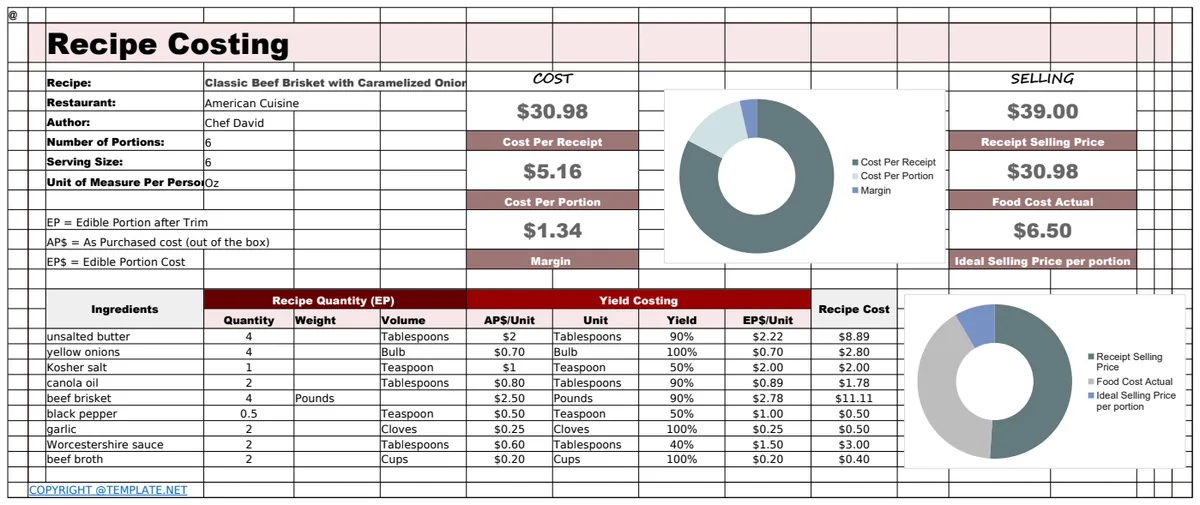
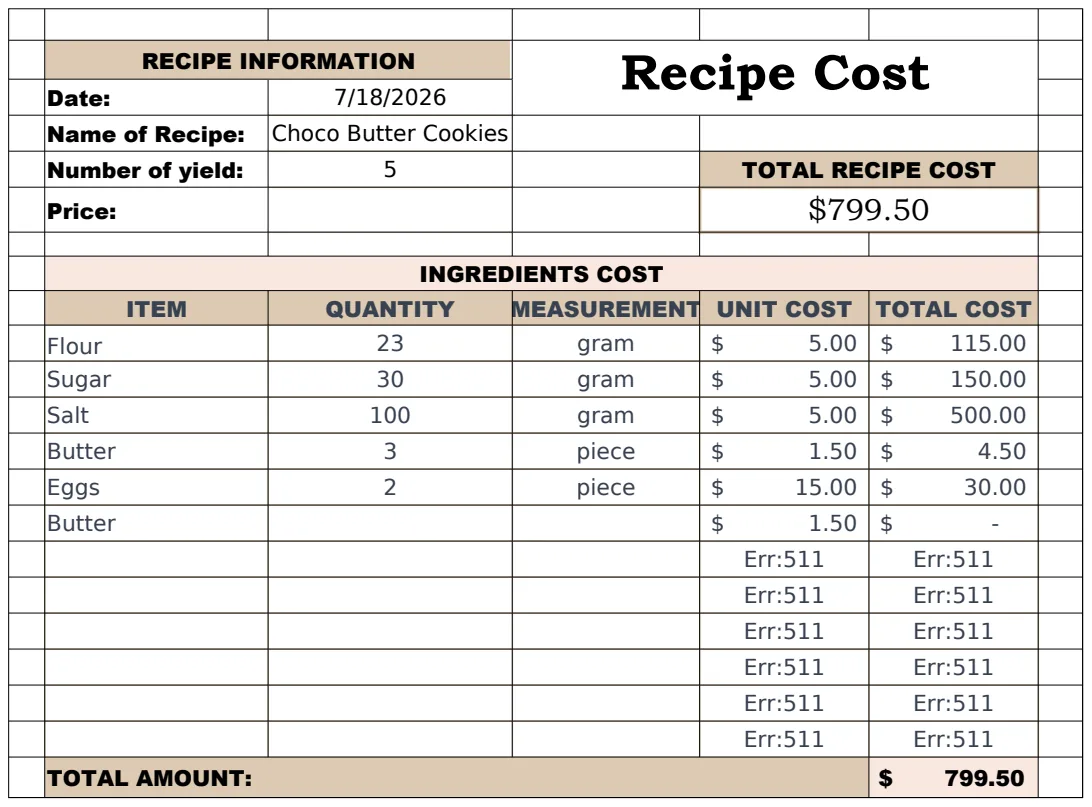
With your ingredient costs locked down, you can build your recipes. Each recipe needs its own row or section, detailing every ingredient and the quantity used.
Here’s how to set up your recipe sheet:
- Recipe Name: The name of the dish (e.g., "Classic Caesar Salad," "Spicy Chicken Curry").
- Yield (Servings): How many portions this recipe makes. This is critical for calculating cost per serving.
- Ingredient Name: Link this to your "Ingredient Name" column from your ingredient tracking sheet. Using data validation here is a smart move to ensure consistency.
- Quantity Used: The amount of that ingredient called for in the recipe, using the "Unit of Measure for Recipes" (e.g., 4 oz of flour, 100 grams of chicken breast, 2 large eggs).
- Unit of Measure: This should match the "Unit of Measure for Recipes" from your ingredient sheet.
- Cost Per Recipe Unit: This is where you'll pull the calculated cost from your ingredient sheet. A formula like
=XLOOKUP([Ingredient Name], 'Ingredients'!A:A, 'Ingredients'!H:H,, 2)would work if your ingredient names are in column A and the "Cost Per Recipe Unit" is in column H of your 'Ingredients' sheet. - Line Item Cost: This is the cost for the specific amount of the ingredient used in this recipe:
= [Quantity Used] * [Cost Per Recipe Unit]. - Total Recipe Cost: Sum of all "Line Item Cost" for a given recipe. This can be a simple
=SUM(E:E)if all your line item costs are in column E for that recipe. - Cost Per Serving:
= [Total Recipe Cost] / [Yield (Servings)].
This structured approach allows you to create a robust Food Cost Template that accurately reflects your actual ingredient expenses.
Calculating Food Cost Percentage
Your food cost percentage is a key performance indicator for any food business. It’s calculated as:
Food Cost Percentage = (Total Recipe Cost / Selling Price) * 100
To implement this in your spreadsheet:
- 01Add a "Selling Price" column to your recipe costing sheet.
- 02Add a "Food Cost Percentage" column.
- 03The formula:
= ([Total Recipe Cost] / [Selling Price]) * 100.
You can then use conditional formatting to highlight recipes where the food cost percentage exceeds a target you've set (e.g., 30%). This immediately tells you which dishes might need a price adjustment or a review of their ingredient quantities.
Common Mistakes to Avoid
Many users stumble when building their own food cost calculator spreadsheet template. Here are a few pitfalls to watch out for:
- Inconsistent Units: This is the most frequent error. If you buy flour by the pound but measure it in ounces for recipes, you must have a conversion factor. Forgetting this leads to wildly inaccurate costs.
- Ignoring Waste/Trim: The chicken breast you buy isn't 100% edible. You need to account for the weight lost during trimming and cooking. This is often done by adding a "Yield Percentage" column to your ingredient sheet and adjusting the "Cost Per Recipe Unit" accordingly. For example, if your chicken breast has an 80% yield, you'd divide its cost per pound by 0.80 to get the actual cost of the edible portion.
- Not Updating Prices: Ingredient costs fluctuate. If you don't regularly update your ingredient price list, your entire costing model becomes obsolete. Schedule weekly or bi-weekly price reviews.
- Using Generic Ingredient Names: "Tomatoes" isn't specific enough. Are they Roma, beefsteak, or cherry tomatoes? Each has a different price and potentially a different use. The more granular you are, the more accurate your costs will be.
- Forgetting Small Items: Spices, oils, garnishes. These might seem insignificant, but their cumulative cost can add up. Ensure every single component of a dish is accounted for.
Advanced Features and Considerations
Once you have the core functionality of your food cost calculator spreadsheet template working, you can explore enhancements.
Inventory Management Integration
For a more sophisticated system, you can link your food cost calculator to an inventory sheet. When you use an ingredient in a recipe, the system can automatically deduct the used amount from your current stock. This helps prevent stockouts and provides a real-time view of your inventory value. While complex to build from scratch, templates like the Food Cost Template often include these capabilities.
Menu Engineering
Beyond just calculating costs, you can use this data for menu engineering. Plotting your dishes on a matrix of profitability versus popularity can reveal strategic opportunities. High-profit, high-popularity items are your stars. Low-profit, high-popularity items might need a price increase or ingredient cost reduction.
Batch Costing
Some recipes are made in large batches. Your template should easily accommodate this. If a recipe yields 50 servings but you make it in a batch of 100, simply double the ingredient quantities and the total cost. The cost per serving will remain the same, but your batch cost will reflect the larger production run.
Different Units of Measure for Recipes
Sometimes, a recipe might call for an ingredient in a different unit than you typically purchase or track. For instance, you might buy olive oil by the gallon but use it in recipes by the milliliter. Ensure your "Conversion Factor" handles these scenarios accurately.
Frequently Asked Questions
How often should I update my ingredient prices?
You should update ingredient prices whenever they change significantly, but at a minimum, conduct a full review weekly or bi-weekly. This ensures your food cost percentage calculations remain accurate, which is crucial for profitability.
Can I use a food cost calculator spreadsheet template for a home kitchen?
Absolutely. While often associated with restaurants, a Recipe Cost Calculator is invaluable for home cooks looking to budget or understand the true cost of their meals. It’s particularly useful for meal planning or if you're cooking for a large event.
What if I have ingredients I use very little of, like a pinch of saffron?
For very small quantities, you can either calculate the cost of that tiny amount (e.g., cost per gram for saffron) or, for items used in trace amounts across many recipes, you can assign a nominal cost or average them into broader categories if precision isn't paramount. However, for accuracy, calculating the precise cost per unit is always best.
How do I handle ingredients that are purchased in different sizes or units from different suppliers?
This is where the "Unit of Purchase," "Quantity Purchased," "Cost Per Purchase," and "Unit of Measure for Recipes" columns become critical. Each distinct purchase of an ingredient, especially if priced differently or in a different size, should ideally have its own entry or be managed through a system that averages costs or uses a FIFO (First-In, First-Out) method if you’re tracking inventory closely. The key is to get the most accurate "Cost Per Recipe Unit" possible.