Stop guessing with your nonprofit budget template
Stop guessing with your nonprofit budget template. Learn how to create a clear financial roadmap for your organization's success.
The most common pitfall for nonprofits using a budget template is misallocating funds, often stemming from an overly simplified expense categorization that doesn't reflect the reality of program delivery and overhead. This leads to surprise deficits or underfunded initiatives. Finding a truly effective nonprofit budget template Excel free can be a challenge because many free options lack the granular detail needed for accurate financial oversight.
A well-structured budget isn't just a spreadsheet; it's a roadmap. It should clearly distinguish between direct program costs, administrative overhead, and fundraising expenses, allowing for precise tracking against planned allocations. Without this clarity, managing cash flow and demonstrating fiscal responsibility to donors and grantors becomes significantly harder.
Understanding Core Budget Components
For any nonprofit, the budget must reflect the organization's mission. This means categorizing income and expenses in a way that aligns with how your work is funded and delivered. Typically, this involves sections for:
- Revenue: This includes grants, individual donations, corporate sponsorships, program service fees, and investment income. It's crucial to break down grants by source and type (e.g., restricted vs. unrestricted) if possible.
- Program Expenses: These are the direct costs associated with delivering your services or fulfilling your mission. For an animal shelter, this might include food, veterinary care, and staff salaries for animal handlers. For an educational nonprofit, it could be curriculum development, teacher stipends, and classroom supplies.
- Administrative Expenses (Overhead): These are the costs of running the organization itself, not directly tied to a specific program. Think rent, utilities, insurance, general office supplies, and salaries for administrative staff, finance personnel, and executive leadership.
- Fundraising Expenses: This category covers the costs incurred to generate revenue, such as grant writing fees, event planning costs for fundraisers, and donor communication expenses.
Accurately delineating these areas is key to understanding your true operational costs and the efficiency of your programs.
Building Your Nonprofit Budget Spreadsheet
When starting from scratch or adapting a generic template, consider these essential columns for your income and expense tracking. For income, you might have:
- Revenue Source: (e.g., "Smith Foundation Grant," "Annual Gala," "Individual Donors - General Fund")
- Budgeted Amount: The projected income for this source.
- Actual Amount: The actual income received.
- Variance: The difference between Budgeted and Actual (Actual - Budgeted). This is often calculated using a simple formula like
=C2-B2in Excel or Google Sheets, assuming "Actual" is in column C and "Budgeted" is in column B. - Notes: Any relevant details, like grant restrictions or payment schedules.
For expenses, a similar structure applies, but with more detail:
- Expense Category: (e.g., "Program Supplies," "Rent," "Marketing," "Staff Training")
- Sub-Category: (e.g., under "Program Supplies," you might have "Art Materials," "Educational Kits")
- Budgeted Amount: The planned expenditure.
- Actual Amount: The actual expenditure.
- Variance:
=D2-C2(assuming "Actual" in D, "Budgeted" in C). Negative variances here mean you've spent more than planned. - Department/Program: If your organization runs multiple programs, assign the expense to the relevant one.
- Date Incurred: When the expense was paid or committed.
- Payment Method: (e.g., "Check," "Credit Card," "ACH")
- Notes: Details about the vendor, invoice number, or purpose.
This level of detail allows for much deeper analysis than a simple lump-sum approach.
Key Formulas for Your Budget Template
Beyond basic subtraction for variance, several formulas can make your budget template more powerful.
- SUMIF/SUMIFS: These are invaluable for aggregating income or expenses based on specific criteria. For example, to sum all expenses for "Program A," you might use
=SUMIF(ExpenseCategoryColumn, "Program A", BudgetedAmountColumn). If you also want to sum only for a specific month,SUMIFSis your friend:=SUMIFS(BudgetedAmountColumn, ExpenseCategoryColumn, "Program A", MonthColumn, "January"). - XLOOKUP (or VLOOKUP/INDEX MATCH): If you have separate sheets for detailed transaction logs,
XLOOKUPcan pull specific data into your summary budget sheet. For instance, to pull the total expenses for a vendor from a transaction log to your main budget, you could set up a lookup. - Conditional Formatting: This is crucial for quickly spotting issues. You can set rules to highlight variances. For example:
- Highlight cells in the "Variance" column red if the value is negative (for expenses) or positive (for income, if it's less than expected).
- Highlight cells green if variances are within an acceptable range (e.g., +/- 5%).
These formulas transform a static list into a dynamic financial tool.
When Free Templates Fall Short
Many nonprofit budget template Excel free options available online are too generic. They might have broad categories like "Supplies" or "Salaries" without allowing for the specific breakdown needed to track grant compliance or program-specific costs. This often means you'll spend more time customizing a free template than you would have spent building one with the right structure from the start.
A common issue is the lack of a clear distinction between direct program costs and indirect (overhead) costs. Many grants require precise reporting on how much of the funding goes directly to program activities versus administrative costs. A template that lumps these together makes compliance difficult.
Another limitation is the absence of built-in reporting or charting capabilities. A good budget template should offer visual summaries, like pie charts for expense allocation or bar charts comparing budgeted vs. actual spending, to make financial data easily digestible for board members and stakeholders.
Customizing for Program-Specific Needs
If your organization runs distinct programs, a single, overarching budget might not suffice. You may need to allocate expenses and track income per program. This is where a specialized template becomes highly beneficial. For example, if you manage a youth mentorship program and a community gardening initiative, you'll want to see the costs associated with each separately. This could involve adding a "Program" column to your expense sheet and then using SUMIFS to total costs for each program.
The Free Nonprofit Program Budget Template is designed precisely for this scenario, allowing you to plan and track spending at the individual program level, ensuring that each initiative is adequately funded and managed within its allocated budget. This granular approach is vital for grant reporting and for understanding the true cost-effectiveness of each program.
Common Mistakes to Avoid
- Overly Broad Categories: As mentioned, "Miscellaneous" or "Other" expenses should be minimized. This lack of detail obscures where money is actually going.
- Ignoring Fundraising Costs: Underestimating or failing to track the cost of raising money can lead to an inaccurate picture of net revenue.
- Failing to Update Regularly: A budget is a living document. Not updating it with actual figures means it quickly becomes irrelevant for decision-making. Aim for at least monthly updates.
- Not Differentiating Restricted vs. Unrestricted Funds: Spending restricted grant money on general operating expenses is a serious compliance issue. Your budget should reflect these restrictions.
- Forgetting Depreciation or Amortization: For larger organizations with significant assets, these non-cash expenses are part of the true cost of operations and should be accounted for.
Refining Your Budgeting Process
What if I need a budget for a specific grant?
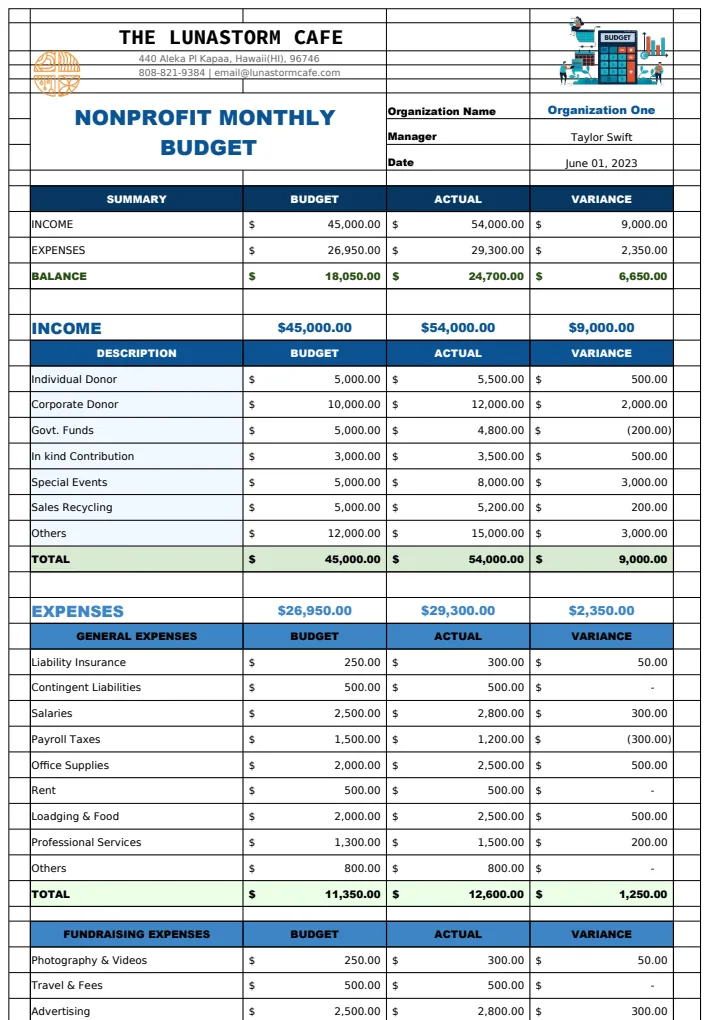
For grant-specific budgeting, you'll need to tailor your template to match the grant's reporting requirements exactly. This often means creating a separate budget sheet or a dedicated section within your main budget that mirrors the grant's categories and line items. Ensure you are only including expenses permissible under that grant and accurately reflecting any matching funds or in-kind contributions required. You might find a template like the Nonprofit Monthly Budget Template can be adapted, or you may need to build a highly specific one.
How do I handle unexpected income or expenses?
Unexpected income, like a surprise donation, can be allocated to a reserve fund, used to cover existing deficits, or earmarked for a specific future project. Unexpected expenses should first be reviewed against your contingency fund, if you have one. If not, you'll need to identify which budget line item can be reduced to cover the shortfall. This might involve delaying a purchase, finding a less expensive alternative, or, in some cases, reallocating funds from less critical areas. Transparently documenting these adjustments is important.
Can I use a template that isn't specifically for nonprofits?
While you can adapt a general business budget template, it's usually not ideal. Nonprofits have unique funding streams (grants, donations) and reporting requirements that differ significantly from for-profit businesses. A dedicated nonprofit budget template Excel free or a paid option will already have the necessary categories for revenue sources like grants and fundraising, and will be structured to help you track program vs. administrative costs, which are critical for demonstrating impact and accountability. The Nonprofit Monthly Budget Template US offers features like automatic totals and budget vs. actual charts that are tailored for this.
What's the difference between the Monthly Budget templates?
The core difference between templates like the Nonprofit Monthly Budget Template A4, the general Nonprofit Monthly Budget Template, and the US version lies primarily in formatting and slight regional considerations. The A4 version is optimized for printing on A4 paper, common outside North America. The general version provides a robust framework for monthly tracking, while the US version might include specific nuances relevant to US accounting standards or common US funding practices. All are designed to help organizations manage income, expenses, and financial planning effectively on a month-to-month basis.
For a one-time fee of $9, you can access a library of templates, including several specifically designed for nonprofit budgeting, offering a quick start to better financial management.