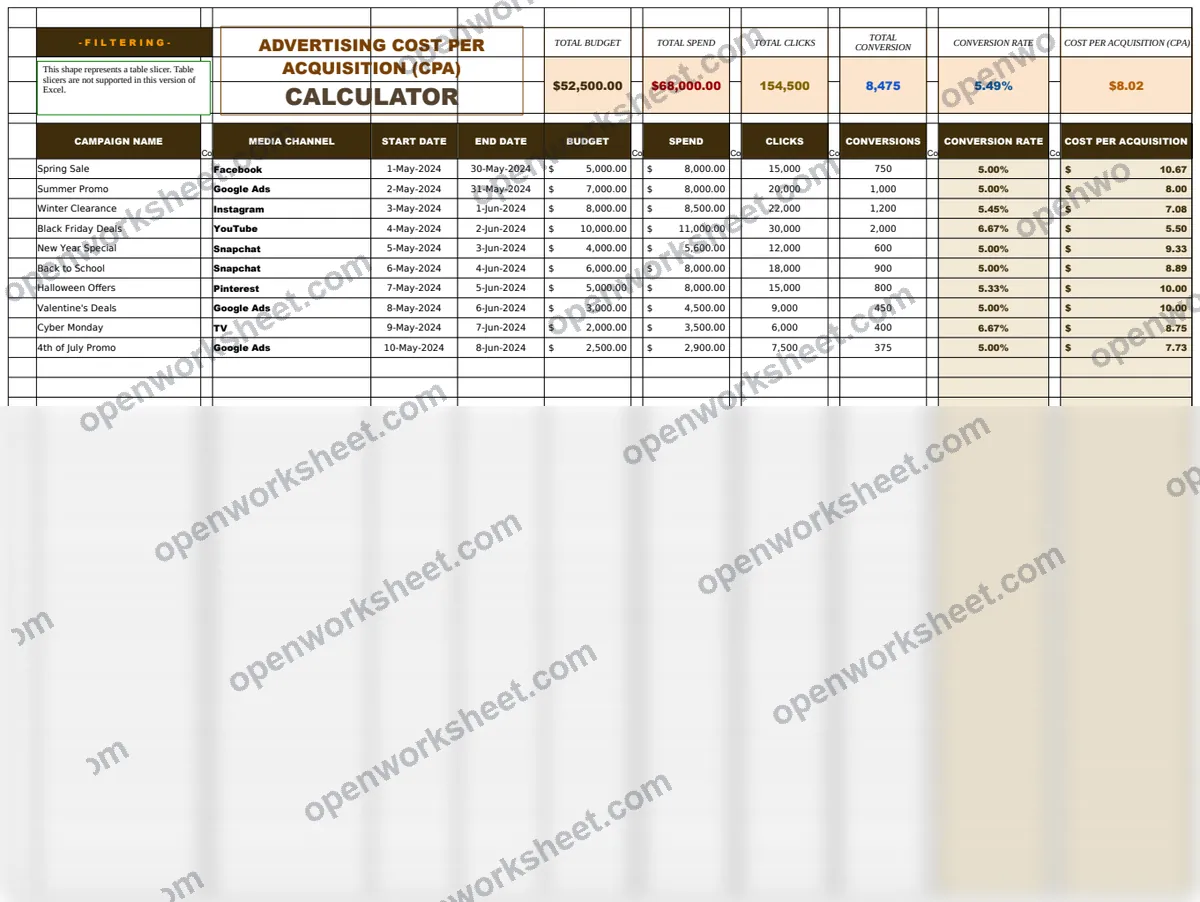
Advertising Cost Per Acquisition (CPA) Calculator Template
Calculate and track cost per acquisition across multiple advertising campaigns and media channels with filtering and budget analysis capabilities.
Get this template
.xlsx · 2 sheets
This template
$5.95single payment
- Nothing renews
- Download it again whenever you need
- Yours to keep and edit
Monthly plan
$14.95/month
- This template plus 9 more every month
- About $1.50 a template if you use all 10
- Thousands of templates to choose from
- Cancel anytime
- Secure checkout via Creem
- Instant download after payment
- 14-day refund policy
A comprehensive advertising cost per acquisition (CPA) calculator designed to help marketers and advertising managers analyze campaign performance across different channels and time periods. The template allows you to input campaign data including budget, spend, clicks, and conversions, then automatically calculates key metrics like conversion rate and CPA. Features include campaign filtering by name, date range, and media channel, with pre-configured setup options for months and popular advertising platforms. Use IF, IFERROR, and SUM formulas to aggregate performance data and generate actionable insights for optimizing ad spend efficiency.
What's inside
- Campaign filtering by name, date range, and media channel
- Automatic CPA calculation from spend and conversion data
- Conversion rate tracking and analysis
- Budget vs. actual spend comparison
- Multi-channel campaign aggregation
- Pre-configured media channel options
- Pre-configured monthly period setup
- Dynamic totals and summary metrics
More in Sales & CRM
 Sales & CRM
Sales Report in Excel with Dashboard: Monthly, Weekly and Daily Sales Report Template
A sales report in Excel that builds itself from your sales data: a dashboard, a monthly sales report against last month, last year and target, weekly and daily sales reports, rep performance by month, and product and customer rankings.
- 12 tabs, from a quick-start guide to Settings
- Sales data sheet with automatic lookups and row checks
- Dashboard with monthly, region and rep charts
 Sales & CRM
Commission Sheet Template: Sales Commission Calculator in Excel with Tiers & Accelerators
A commission sheet template and sales commission calculator in Excel: flat, tiered and retroactive plans with quota attainment, accelerators, caps, splits, clawbacks, draws and a monthly statement for every rep. Includes a commission invoice format for agents.
- 12 connected tabs, from a quick-start guide to Settings
- Flat, tiered and retroactive commission plans
- Up to 6 tiers per plan, set as a % of quota
 Sales & CRM
Multi-Channel E-Commerce Command Center
A profit and inventory system in Excel for sellers on Amazon, eBay, Etsy and Shopify. Paste each platform's order report as downloaded and see true profit per channel after fees, fulfillment and cost of goods, with low-stock alerts.
- 12 connected tabs, from a quick-start guide to Settings
- Paste Amazon, eBay, Etsy and Shopify reports as downloaded
- Columns found by header name, any order
 Sales & CRM
MEDDPICC & BANT Sales Qualification System
An enterprise sales qualification system in Excel. Score every deal on MEDDIC, MEDDICC or MEDDPICC, grade leads with BANT and map account hierarchies and buying committees.
- 11 connected tabs, from a quick-start guide to Settings
- MEDDPICC scorecard for up to 300 opportunities
- Switch between MEDDIC, MEDDICC and MEDDPICC with weights