
Fixed Assets Register Template Excel with Depreciation Schedule
A fixed assets register template in Excel with a depreciation schedule: track each asset's location and custodian, depreciate monthly by straight-line, declining balance or sum-of-years' digits, record disposals with gain or loss, and produce the year-end roll-forward and net book value report.
Fixed Asset Register & Depreciation Schedule is an asset register template in Excel built the way accountants keep one. Record each asset once with its ID, description, category, location, custodian, supplier, invoice reference, serial or tag number, purchase date, in-service date and cost. The register then shows the method and life used, the monthly charge, depreciation for the year, accumulated depreciation, net book value, % depreciated, age, the month it will be fully depreciated and a status of in use, fully depreciated, disposed, not depreciated or below threshold.
Each category sets a default method, useful life, residual value % and ledger accounts, and any asset can override them. Straight-line, declining balance and sum-of-years' digits are built in. Declining balance uses a factor you choose, such as 2.0 for double declining or 1.5, and switches to straight-line when that gives more, so every asset reaches its residual value at the end of its life. Land and assets under construction can be set to not depreciated.
Depreciation is worked out by month from the in-service date, with a choice of convention: a full month in the month acquired, or starting the month after. Monthly, year-to-date and full-year figures always agree. Change the report month on Settings and every tab rolls forward. The Depreciation Schedule shows depreciation by category for each month of the fiscal year, actual and forecast, with the journal entry for the report month using your account codes.
Disposals record sales, trade-ins, scrapping and write-offs with the date, proceeds and costs of disposal. Depreciation stops, the asset leaves the totals and the gain or loss is calculated against book value. The Fixed Asset Schedule gives the roll-forward your accounts need: cost and accumulated depreciation opening, additions, disposals, charge and closing by category, net book value, and checks that tie it back to the register and the monthly schedule.
The Asset Card prints one asset's details and year-by-year depreciation schedule over its whole life for audit or insurance files. The Dashboard shows cost, net book value, depreciation year to date, gains on disposal, book value by category, a six-year depreciation forecast, assets by location and items that need attention. Capacity covers 200 assets and 100 disposals, with any fiscal year start. This is for book depreciation; tax depreciation rules differ by country. Calculated cells are locked and sheet protection has no password. Sample data from a fictional company is included. Built for Microsoft Excel 2016 or later (desktop or Excel for the web) and contains no macros.
What's inside
- 10 tabs, from a quick-start guide to the depreciation engine
- Asset register with location, custodian, supplier and serial or tag
- Straight-line, declining balance and sum-of-years' digits
- Declining balance factor with switch to straight-line
- Category defaults with per-asset overrides
- Monthly depreciation with a choice of month convention
- Disposals with proceeds, costs and gain or loss
- Fixed asset schedule roll-forward by category
- Self-checks against the register and monthly schedule
- Monthly depreciation by category with forecast
- Depreciation journal with your account codes
- Asset card with a life-of-asset depreciation schedule
- Dashboard with six-year depreciation forecast
- Locked formulas, no macros
Download this template
.xlsx · 10 sheets · includes charts
$9/monthDownload up to 10 templates a month from a library of thousands. Cancel anytime.
- 10 downloads every month
- Cancel anytime
- 14-day refund policy
More in Accounting & Bookkeeping
 Accounting & Bookkeeping
Statement of Account Template Excel with Accounts Receivable Aging Report
A statement of account template in Excel with an accounts receivable aging report: log invoices and payments once, print a customer statement with a running balance and remittance slip, age every balance into current, 30, 60, 90 and 90+ days, and follow a collection priority list with DSO.
- 8 tabs, from a quick-start guide to Settings
- Invoice, payment, credit note and write-off log
- Payments and credits applied to specific invoices
 Accounting & Bookkeeping
Cash Flow Forecast Template Excel: 13-Week Cash Flow with 12-Month Projection
A cash flow forecast template in Excel for the next 13 weeks: receipts and payments by category, receivables collections and payables timing, recurring and one-off items, opening balance roll-forward, minimum cash alerts, actual vs forecast variance and a 12-month cash flow projection.
- 12 tabs, from a quick-start guide to the forecast engine
- 13 weeks of receipts and payments by category
- Opening balance roll-forward to closing balance
 Accounting & Bookkeeping
Bank CSV to Ledger Bookkeeping & Reconciliation
A bookkeeping system in Excel that turns raw bank and card CSV exports into categorized double-entry books, flags duplicates, missing lines and other errors automatically, and reconciles every account.
- 14 connected tabs, from a quick-start guide to Settings
- Paste raw bank and card CSV exports as downloaded
- CSV profiles for any bank layout, date and number format
 Accounting & Bookkeeping
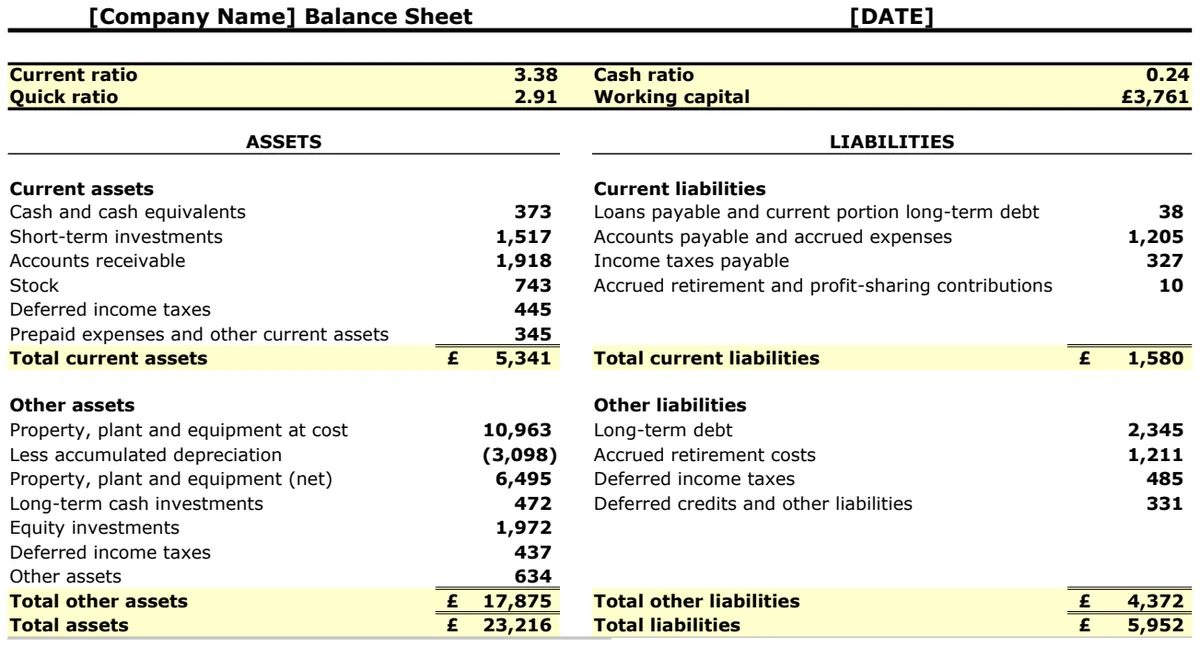
Balance Sheet with Ratios and Working Capital
Track financial position and calculate key liquidity ratios to assess business solvency instantly.
- Current ratio calculation
- Quick ratio formula
- Cash ratio tracking