Need a free Excel packing list template?
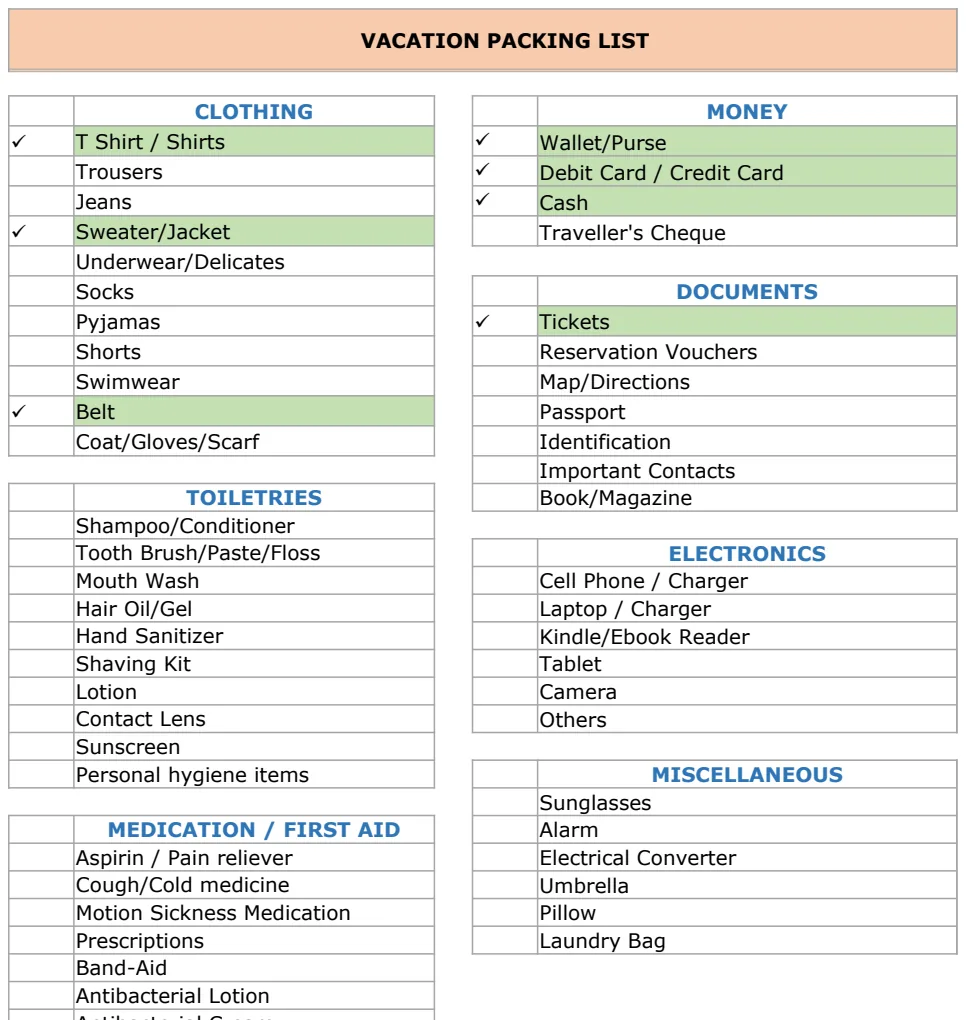
Discover a free packing list template in Excel or Google Sheets to save time and mental energy when organizing your trip.
Scrambling for a last-minute item or discovering you forgot your toothbrush at the hotel is a common travel frustration. While you could write a packing list from scratch each time, a well-structured template saves you time and mental energy, making a free packing list template in Excel or Google Sheets a practical solution for organizing your trip.
You can find a functional packing list template Excel free that meets your needs, but not all templates are created equal. Some are too basic, others overly complicated. The best ones offer clear categories, space for quantities, and perhaps even a checkbox for items packed.
Why Use a Template for Packing
A packing list isn't just a random collection of items. It's a strategic tool designed to ensure you have everything you need for a successful trip, whether it's a weekend getaway, a business conference, or an international adventure. Relying on memory alone is risky; key items can easily be overlooked, leading to inconvenience or unexpected expenses. A template provides a consistent framework, forcing you to think through different categories of items, from clothing and toiletries to medications and important documents. This systematic approach minimizes the chance of forgetting something crucial.
Building Your Own vs. Using a Pre-made Template
Building a packing list from scratch can be a time-consuming endeavor, especially if you're starting with a blank spreadsheet. You'll need to decide on categories, item names, and how to organize the information. While this offers maximum customization, it often takes longer than necessary. A pre-made template, particularly a good packing list template Excel free, gives you a head start. It usually comes with pre-defined categories like "Clothing," "Toiletries," "Electronics," and "Documents." You can then modify these categories, add or remove items, and tailor the list to your specific destination and planned activities. It’s a balance between efficiency and personalization.
Key Components of an Effective Packing List Template
When evaluating or creating a packing list, several components are essential for functionality. At a minimum, you'll want columns for:
- Item: The name of the item you need to pack (e.g., "Toothbrush," "Passport," "Laptop Charger").
- Category: Grouping items logically helps ensure you don't miss entire sections. Common categories include Clothing, Toiletries, Medications, Electronics, Documents, and Miscellaneous.
- Quantity: How many of each item you need (e.g., "2 pairs" of socks, "1 bottle" of shampoo).
- Packed (Checkbox/Status): A simple way to mark items as they are placed in your luggage. This is crucial for real-time tracking as you pack.
For more advanced lists, consider adding columns for:
- Location: Where the item is typically stored at home, to help locate it for packing.
- Notes: Any specific details about the item, like brand preference or size requirements.
- Importance/Urgency: Highlighting critical items like medications or travel documents.
How to Customize a Free Packing List Template
Let's say you found a packing list template Excel free that's a good starting point but needs tweaking for your upcoming beach vacation. Here’s a practical walkthrough of how you might customize it:
- 01Open Your Template: Launch the Excel or Google Sheets file.
- 02Review and Rename Categories: Look at the existing categories. If you see "Business Attire," you might rename it to "Swimwear & Beachwear" or "Casual Outfits." Add new categories if needed, such as "Snorkel Gear" or "Beach Towels."
- 03Add or Remove Items:
- Add: Under "Clothing," type "Sun Hat," "Flip-flops," and "Beach Cover-up" into new rows.
- Remove: If the template includes "Formal Shoes" and you're not going anywhere fancy, delete that row.
- 04Adjust Quantities: Change the quantity for items like "T-shirts" from "3" to "5" if you plan to be active. Adjust "Socks" to "0" if you're packing only sandals.
- 05Implement Checkboxes: In Excel, you can insert checkboxes. Go to the "Developer" tab (if not visible, enable it in File > Options > Customize Ribbon) and click "Insert" > "Form Controls" > "Check Box." In Google Sheets, you can use Data Validation. Select the cells in your "Packed" column, go to "Data" > "Data validation," choose "Checkbox" for the criteria, and click "Save."
- 06Add a Notes Column: Insert a new column next to "Quantity" and label it "Notes." Here you can add reminders like "Pack in carry-on" for your medication or "Check battery level" for your camera.
- 07Conditional Formatting (Optional but useful): To visually distinguish packed items, you can apply conditional formatting. Select the rows containing your items, go to "Conditional Formatting," and set a rule. For example, if the checkbox in the "Packed" column is checked, format the entire row with a light gray fill and strike-through text. This makes it easy to see what's left to pack.
Common Mistakes to Avoid When Packing
Even with a template, some common pitfalls can derail your packing efforts.
- Packing "Just in Case" Items You Won't Use: Overpacking is a frequent error. Unless an item is critical (like prescription medication) or you're certain you'll need it for a specific activity, leave it at home. This saves space and reduces the weight of your luggage.
- Forgetting Destination-Specific Needs: A generic list might not account for local customs, weather extremes, or specific activities. Research your destination thoroughly. If you're going somewhere with strict dress codes, add those items. If you're hiking, ensure you have appropriate footwear and gear.
- Not Checking Your Luggage Weight: Airlines have strict weight limits. Overpacking can lead to hefty excess baggage fees. Weigh your bags before you leave for the airport.
- Not Packing Essentials in Carry-On: For longer trips, always pack a change of clothes, essential toiletries, medications, and important documents in your carry-on bag. This way, if your checked luggage is lost or delayed, you'll still have what you need.
- Ignoring the "Documents" Category: This is one of the most critical categories. Passports, visas, driver's licenses, flight confirmations, hotel bookings, and emergency contact information should always be accounted for and easily accessible.
Template Options to Consider
While you can certainly build your own, there are pre-made options that can save you significant time. The Packing List Templates collection offers a variety of organized checklists suitable for different travel needs, including vacations and business trips. For a more comprehensive trip planning experience, the Family Travel Planner integrates packing lists with other essential travel details. If you're looking for something straightforward for personal use, the Vacation Packing List provides a clear, category-based checklist. For tracking not just items but also crucial documents and pre-trip tasks, the Vacation Items Checklist is an excellent choice. Many of these are available as a free packing list template Excel download or for Google Sheets.
What if I'm packing for multiple people?
If you're packing for a family or a group, you'll want to duplicate your template and customize each version for the individual. Add a column for "Person" and then filter or sort by that column. Alternatively, create separate tabs within your spreadsheet for each person's list, ensuring everyone has exactly what they need.
How do I handle medication?
Medication should always be in its original container with the prescription label. Pack all necessary medications in your carry-on bag, not in checked luggage. Add a specific line item for each medication on your packing list, noting the quantity required for the duration of your trip, plus a few extra doses just in case.
Can I use this for more than just vacations?
Absolutely. The principles of a packing list apply to many scenarios. You can adapt a template for a camping trip, a business conference, a move to a new apartment, or even for a hospital stay. The key is to adjust the categories and items to match the specific requirements of the event.
What if I want to track expenses too?
While a packing list focuses on items, you might also need to track your travel budget. Some comprehensive travel planners integrate expense tracking alongside packing lists and itineraries. If your chosen packing list template doesn't have this feature, you can easily create a separate spreadsheet for expenses or look for a dedicated budget template. For a one-time fee of $9, you can access unlimited downloads from our library, which includes both packing lists and budget trackers.