The 7 essential sections for your wedding budget spreadsheet
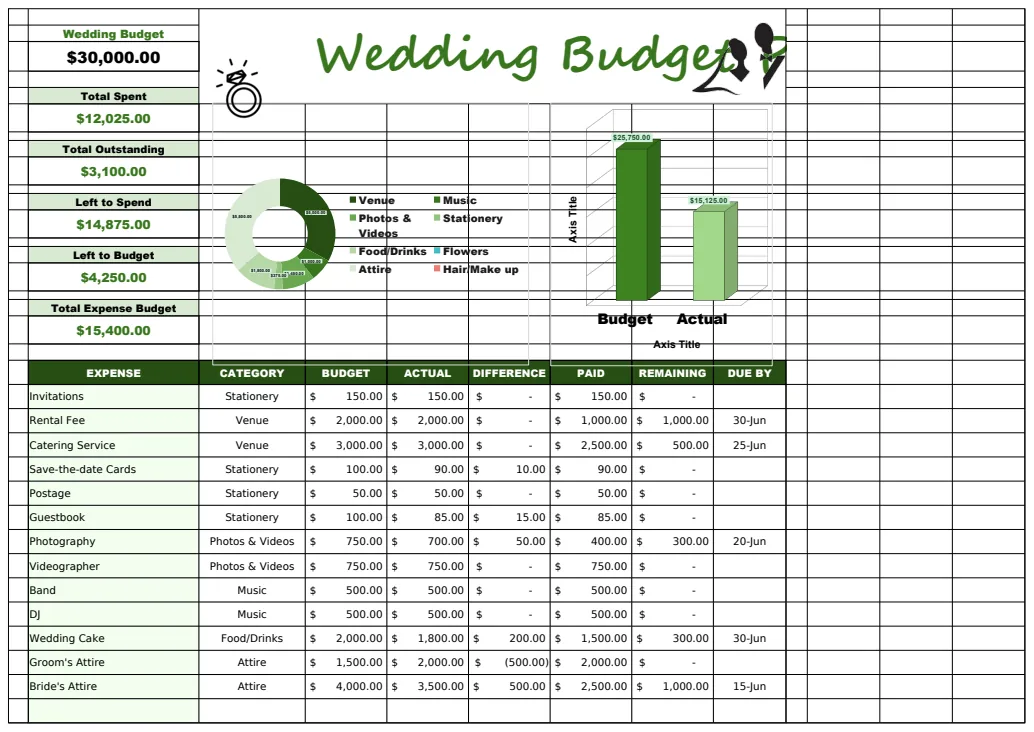
A simple wedding budget spreadsheet template free should simplify, not complicate, the process of tracking your big day's costs.
The most common reason people abandon a wedding budget spreadsheet is that it becomes too complicated to update, leading them to simply stop entering new expenses. This often happens when the template requires manual data entry into dozens of cells for every single vendor or purchase. A truly useful wedding budget spreadsheet template free should simplify, not complicate, the process of tracking your big day's costs.
To that end, a well-structured template focuses on clear categories and straightforward input. You need a place to record your initial budget for each item, the actual amount spent, and ideally, any deposits made. This allows you to see at a glance where you stand and where potential overspending might occur. The goal is to make updating your budget a quick task, not a weekend project.
Setting Up Your Core Budget Categories
Before you even think about specific vendors, lay out your main spending areas. For a wedding, common categories include:
- Venue: Rental fees, catering minimums, service charges.
- Attire: Wedding dress, suit/tuxedo, alterations, accessories, rings.
- Photography & Videography: Photographer fees, videographer fees, album costs.
- Music & Entertainment: DJ, band, ceremony musicians.
- Flowers & Decor: Bouquets, centerpieces, ceremony decor, reception decor.
- Stationery: Save-the-dates, invitations, postage, thank-you cards, programs.
- Officiant: Fee for the person performing the ceremony.
- Transportation: Limo, shuttle buses for guests.
- Wedding Planner/Coordinator: Fees for professional help.
- Cake: Wedding cake cost.
- Favors: Small gifts for guests.
- Rings: Wedding bands.
- Miscellaneous: Gifts for wedding party, marriage license, contingency fund.
Your template should have columns for each of these, with a dedicated row for the budgeted amount. This initial setup is critical for a clear overview.
Tracking Actual Expenses and Deposits
This is where most spreadsheets fall apart. The key is to make entering actual spending as painless as possible. A good template will have a dedicated column for "Actual Amount Spent" next to your "Budgeted Amount."
Crucially, you also need to track deposits. Many vendors require a significant upfront payment. If your "Actual Amount Spent" only reflects the total contract price, you'll quickly misjudge your current cash outlay. Add columns for "Deposit Paid" and "Remaining Balance."
For example, if your caterer costs $8,000 total, and you paid a $2,000 deposit, your "Deposit Paid" column would show $2,000, and your "Actual Amount Spent" might reflect the total contract value, or perhaps just the total cash you've disbursed so far. It's often clearer to have one column for "Total Contracted Amount" and another for "Total Paid to Date." This distinction is vital for cash flow management.
Calculating Variance and Overages
The real power of a budget spreadsheet comes from its ability to show you variance, the difference between what you planned to spend and what you actually spent. Your template should automatically calculate this.
If your budgeted amount is in column B and your actual amount spent is in column C, a simple formula in column D would be =C2-B2 (assuming your first data row is row 2). A positive number here means you're over budget for that line item, while a negative number means you're under.
Many templates also include a "Percentage of Budget Used" column, calculated as =C2/B2. Formatting this as a percentage is essential. This helps you quickly identify which categories are consuming the largest portions of your budget.
A Simple Walkthrough: Adding a New Vendor
Let’s say you’ve booked your photographer for $3,500, with a $1,000 deposit due now. Here’s how you’d typically enter this into a spreadsheet:
- 01Find the "Photography & Videography" category in your template. If you don’t have a specific line item for the photographer, add one.
- 02Enter the total contracted amount in the "Budgeted Amount" or "Total Contracted Amount" column for that row. Let’s say you budgeted $3,000 for photography and the contract is $3,500. You’d enter $3,000 in the budget column and $3,500 in the contracted amount column.
- 03Enter the deposit paid in the "Deposit Paid" column. You'd enter $1,000.
- 04Update the "Actual Amount Spent" or "Total Paid to Date" column. This would also be $1,000 for now.
- 05Check the "Variance" column. If your budgeted amount was $3,000 and you’ve paid $1,000, the variance (calculated as Paid - Budgeted) would be -$2,000 if you are tracking against the budget, or it might show you are $500 over your contracted budget if there's a separate column for that. The exact calculation depends on how your template is set up, but the key is clarity.
- 06When you make the final payment, update the "Total Paid to Date" column to $3,500. The variance will then show how much you are over or under the original $3,000 budget.
This systematic approach ensures that every transaction is accounted for, no matter how small.
Leveraging Conditional Formatting for Alerts
One of the most powerful features in any wedding budget spreadsheet template free is conditional formatting. This automatically changes the appearance of a cell based on its value.
- Highlighting Over-Budget Items: Set up a rule so that any number in the "Variance" column (or a similar "Over Budget" column) that is greater than zero turns red. This makes it immediately obvious which categories need attention.
- Tracking Deposits: You could highlight cells in the "Deposit Paid" column if they are less than a certain percentage of the "Total Contracted Amount," or if the "Total Paid to Date" is still zero but the "Contracted Amount" is non-zero.
- Visualizing Remaining Budget: For your overall budget, you might use a fill color that changes from green (plenty of budget left) to yellow (approaching limit) to red (over budget).
These visual cues are incredibly effective for keeping you informed without having to constantly scan numbers.
Common Mistakes to Avoid
- Not Including a Contingency Fund: Unexpected costs will arise. Aim to set aside 5-10% of your total estimated budget for these surprises. If you don't use it, great. If you do, you won't be scrambling.
- Forgetting Small Expenses: Postage for invitations, tips for vendors, small decor items, these add up quickly. Make sure your categories are granular enough to capture them, or have a robust "Miscellaneous" category.
- Not Updating Regularly: This is the biggest killer of spreadsheet usage. Schedule 15-30 minutes each week to update your spending. It’s much easier than trying to recall everything a month later.
- Using Too Many Spreadsheets: Trying to manage RSVPs in one sheet, vendor contracts in another, and the budget in a third can lead to disconnects. Consolidating where possible simplifies things. A comprehensive planner can often integrate these functions.
- Ignoring the "Why": Don't just fill in numbers. Understand why a certain vendor costs what it does. This helps you negotiate or make informed decisions about where to cut back if necessary.
Frequently Asked Questions
What if my wedding budget is very small?
A small budget simply means you need to be even more diligent with tracking. Prioritize essential categories like venue and attire. Look for free or low-cost alternatives for decor, music, and favors. A good template will still help you see where every dollar is going, making sure you don't overspend on non-essentials. You can often adapt a standard template by simply not using certain rows or by adjusting the budget figures to be much lower.
How do I handle shared costs with a partner or family?
Designate one person as the primary tracker in the spreadsheet. If costs are being split, add columns to indicate who paid what or who owes whom. For example, you might have a "Total Cost" column and a "Your Share" column. Alternatively, if family is contributing to specific categories, you can add notes or separate columns indicating their contribution amount, adjusting your "Budgeted Amount" accordingly.
Can I use a template if I'm not tech-savvy?
Absolutely. The best wedding budget spreadsheet template free is designed for clarity and ease of use. Look for templates that use clear language, have pre-built formulas for calculations, and perhaps offer simple drop-down menus for common entries. Many templates are available in formats like Excel or Google Sheets, both of which are generally user-friendly. The key is a template that guides you through the process.
Where can I find a good, free template?
You can find a variety of options online. For instance, templates like the Wedding Budget Planner Template offer a structured approach to tracking expenses across many categories. Another option is the Wedding Budget Planner, which focuses on allocating your budget and monitoring spending. If you prefer a printable option, there are also formats like the Free Printable Wedding Budget Worksheet Template US available. Many libraries also offer templates that can be downloaded and customized.